Account Linking lets you connect eligible First National Bank Alaska business accounts to third-party accounting software, financial platforms and business tools. You may also hear it called bank linking or connected accounts.
What Account Linking can do for your business
After you connect an account, a third-party platform may retrieve eligible account and transaction information. Depending on the platform, this can help your business:
- View account balances and review transactions
- Find and reconcile transactions
- Import activity into accounting or financial software
- Assign general ledger codes when supported by the software
Eligible First National account types
Account Linking is currently available for eligible checking, savings and loan accounts.
How to connect your account
- Open the accounting software, financial platform or business tool you want to use.
- Find the option to add, link or connect a bank account. It may be labeled Bank feeds, Bank sync, Banking, Link account, Connect account or Add financial institution.
- Search for First National Bank Alaska (Use for personal and business accounts. If you are unable to find First National, try different terms or word strings).
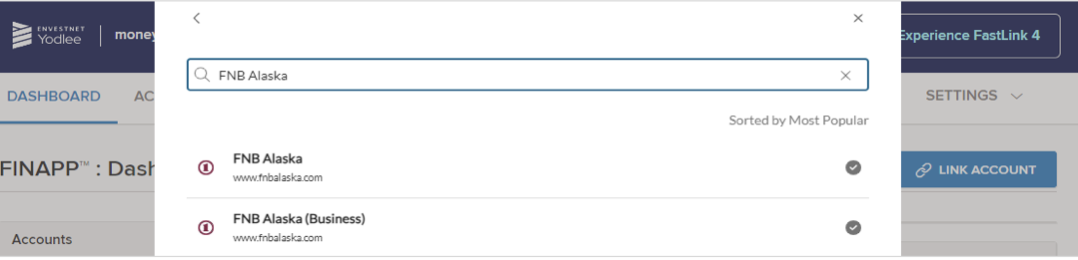
- Choose First National Bank Alaska.
- Enter your First National online banking credentials when prompted.
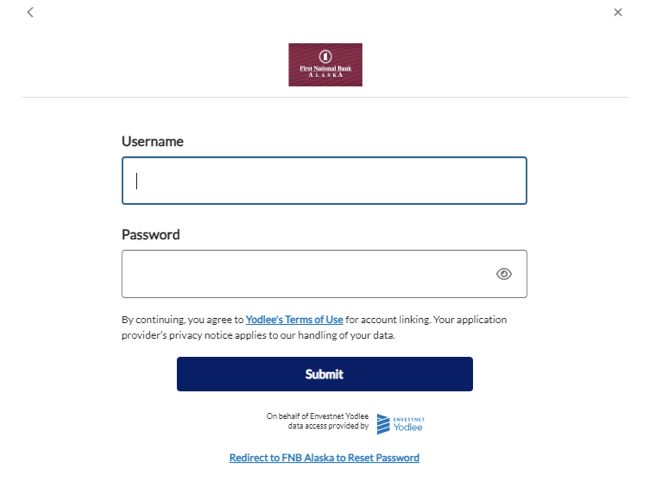
- Follow the platform’s remaining prompts to finish the connection.
Common business software and services
Examples of third-party software and services that are available for business customers to use may include:
- Accounting and bookkeeping: QuickBooks, Quicken, Xero, FreshBooks, Wave, Sage, NetSuite and Microsoft Dynamics
- Payments, invoicing and commerce: BILL, Stripe, Square, PayPal, Shopify, Toast and Clover
- Payroll and workforce services: Gusto, ADP and Paychex
- Expense, spend and planning tools: Expensify, Ramp, Brex and eMoney Advisor
Many other third-party accounting platforms and business systems may also support bank linking through data providers such as Intuit, Plaid, Yodlee, Finicity, eMoney Advisor and MX. Availability can vary by platform, account type and connection method.
First National does not endorse or support these platforms.
Multifactor authentication and connection issues
First National works with supported Account Linking providers to help customers securely connect to their accounts. If you receive a multifactor authentication request, follow the prompts to connect your account(s). If you have trouble connecting your business account, contact us for support.
Need help?
Call our Contact Center at 907-777-4362 or email FNBA@FNBAlaska.com and include the name of the software or service and a brief description of the issue or error message.
Protect your information: Do not email passwords, one-time passcodes, account numbers or other sensitive account information. If including sensitive details, submit a Secure Message in online banking.