Account Linking lets you connect eligible First National Bank Alaska personal accounts to third-party financial apps and services. You may also hear it called bank linking or connected accounts.
What Account Linking can do
After you connect an account, a third-party app may retrieve eligible account and transaction information. Depending on the app, this can help you:
- View balances and review transactions
- Track spending and manage a budget
- Verify a bank account for transfers or payments
- See more of your financial picture in one place
- Real-time funds validation with third-party apps
Eligible First National account types
Account Linking is currently available for eligible checking, savings and loan accounts.
How to connect your account
- Open the financial app or service you want to use.
- Find the option to add, link or connect a bank account. It may be labeled Link account, Connect account, Add bank account, Add financial institution, Bank connection or Bank sync.
- Search for First National Bank Alaska (Use for personal and business accounts. If you are unable to find First National, try different terms or word strings).
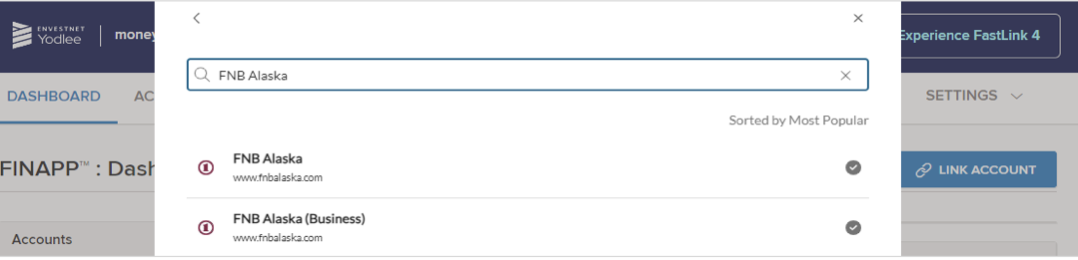
- Choose First National Bank Alaska.
- Enter your First National online banking credentials when prompted.
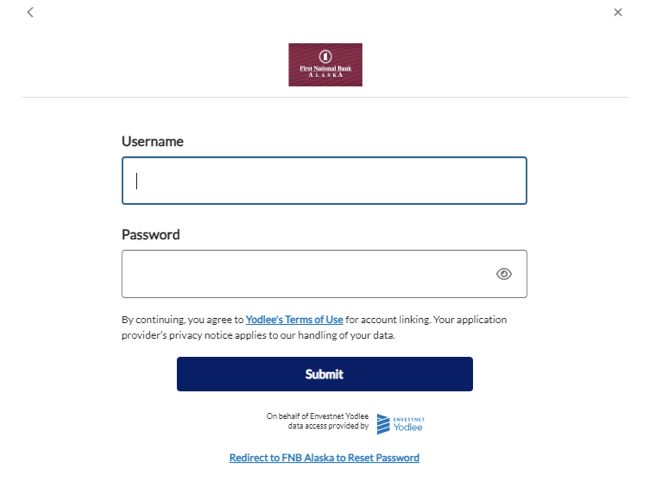
- Follow the app’s remaining prompts to finish the connection.
Common personal apps and services
Examples of third-party software and services that are available for customers to use may include:
- Personal finance and budgeting: Credit Karma, Empower Personal Dashboard, Rocket Money, Monarch Money, YNAB, Quicken Simplifi, Copilot Money and PocketGuard
- Payments and money movement: Venmo, PayPal, Cash App, Apple Cash and Google Pay
- Investing, saving and financial wellness: Acorns, Betterment, Robinhood, Coinbase, SoFi, Chime, Wealthfront, Stash, Public and M1
- Tax and financial planning: TurboTax, H&R Block and eMoney Advisor
Many other third-party financial apps may also support bank linking through data providers such as Intuit, Plaid, Yodlee, Finicity, eMoney Advisor and MX. Availability can vary by app, account type and connection method.
First National does not endorse or support these platforms.
Multifactor authentication and connection issues
First National works with supported Account Linking providers to help customers securely connect to their accounts. If you receive a multifactor authentication request, follow the prompts to connect your account(s). If you have trouble connecting your personal account, contact us for support.
Need help?
Call our Contact Center at 907-777-4362 or email FNBA@FNBAlaska.com and include the name of the software or service and a brief description of the issue or error message.
Protect your information: Do not email passwords, one-time passcodes, account numbers or other sensitive account information. If including sensitive details, submit a Secure Message in online banking.