-
Can I add my First National personal debit card to my digital wallet?
Yes, our personal debit cards are compatible with digital wallets, allowing you to make purchases securely on their mobile devices (smartphone, smartwatch, and tablet) instead of using a physical debit card or cash.
-
What is Mastercard Automatic Billing Updater (ABU)?
The Mastercard ABU service securely provides account changes (e.g. card number and expiration date updates) for your business and personal debit and credit card to participating merchants that you’ve set up to receive recurring payments. At no cost to you, Mastercard’s ABU program helps reduce transaction declines that occur due to changed account numbers and expiration dates.
-
How can I change my email address?
You may update your email address by logging into Personal Online Banking and click on Profile then click on Edit.
-
How do I enroll in Zelle®?
- Log into consumer online banking.
- Click on Pay Bills tab.
- Read and agree to the Terms of Service and click Enroll.
- Enter your mobile phone number and click Enroll.
- Read the Terms of Service for Bill Pay and Zelle and click the “I Accept” button and click Continue.
- Read the Privacy Policy, click the “I Accept” button and click Continue.
- To enroll in Zelle, click on “What else can I do?” at the bottom of the screen.
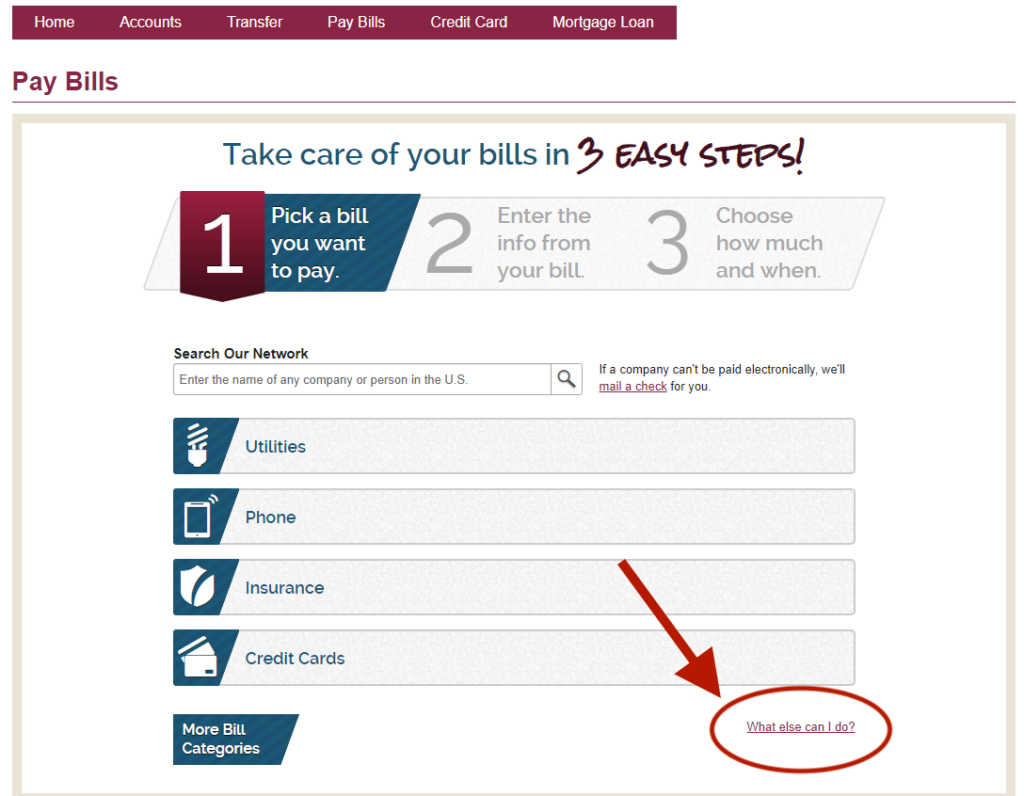
- Navigate to the “Send Money with Zelle” tab.
- Click on “Get Started.”
- Select either your email address or phone number on file and click continue.
- If you select your phone number, read the disclosure and click Ok for the notice on receiving text messages.
- Open your SMS messaging app, enter the six-digit code sent via text, and hit “Verify.” Do not share this information with anyone.
- Review the account information (last four digits of account) and click “Confirm Account.”
- You’re all set up! Click “Send Money” to send your first Zelle payment.
-
How do I opt out of the Automatic Billing Updater service?
You can opt out of this service by calling 907-777-4362 or 800-856-4362.
-
When is my card number and expiration date provided to the participating merchant?
The information is sent to participating merchants when the replacement card is activated.
-
What happens when a new Mastercard card is issued?
If the new card replaces an old card on an existing account, the Automatic Billing Updater service notifies participating merchants of the new card.
-
What will happen when a card is lost, stolen or closed?
When a card is lost, stolen or closed, the Automatic Billing Updater service notifies merchants that the card is no longer valid.
-
What is the benefit of the Mastercard Automatic Billing Updater service?
Mastercard’s Automatic Billing Updater, at no cost to you, helps reduce transaction declines that occur due to changed account numbers and expiration dates.
*You are still obligated to ensure that merchants have correct account information on file; failure to do so may result in a declined payment. Not all merchants participate in the ABU service.
-
How do I enroll to receive electronic statements and notices for business accounts?
New business customers are automatically enrolled in electronic statements and notices. If you were not automatically enrolled, you can enroll anytime by:
- Contacting customer support
- Visiting your local branch
- Contacting your Treasury Management Consultant
-
How do I enroll to receive electronic Statements and notices for personal accounts?
- Log in to Online Banking. (You must first be enrolled in online banking. Learn how.)
- Click Profile on the navigation bar at the top of the page. This link will take you to a list of preferences. Go to Electronic Statements and click Edit.
- Select the account(s) you’d like to enroll in “eStatements.”
- Open the electronic statements terms and conditions link to view the Terms of Use Personal Online Banking Agreement.
- Read and check the box indicating you have read and accepted the electronic statements terms and conditions.
- Click Save.
That’s it! Your checking account electronic statements and notices will be available as soon as your next statement cycle. (Depending on your statement cycle, you may receive one more paper statement.)
If you would like to enroll an account you do not see listed, you can send First National a secure email by clicking the Secure eMail link in the upper right corner of Personal Online Banking. In the email, include the account number to enroll and the email address where you would like to receive notification that your electronic statement is available for viewing.
-
What is a contribution acknowledgment and when is it due?
Each organization approved for a donation will be forwarded a contribution acknowledgment receipt for each donation awarded. The completed contribution acknowledgment receipt should be immediately returned to First National no later than 21 calendar days after receipt. Please note that any organizations with outstanding contribution acknowledgment receipts for previous awarded donations may have future donations requests pended or declined until the missing contribution acknowledgment receipts have been returned.
Page 27 of 34