Entering Wire Entitlements for a New Business
For a new wire business customer, the wire entitlement can’t be given to the business until they have a training date scheduled. At the training, the business user will be given token access and must enable the token prior to the wire entitlement being given to the business.
Wire Entitlements are the access permissions and limits that First National has contracted with the customer using the business online banking (BOB) & Treasury Management Enrollment form (TMO). First National will set up the two senior administrator user entitlements and the company entitlements.
Editing Wire Entitlements for an Existing Business
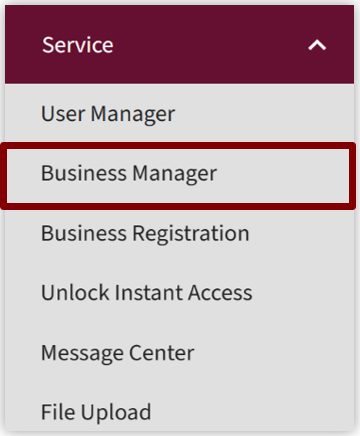
- Select the Service tab from the Admin Portal home page.
Select Business Manager from the drop down menu.
- Enter the information for the business you would like to manage.
Search by:- Business name
- User ID; or
- Tax ID number (TIN)
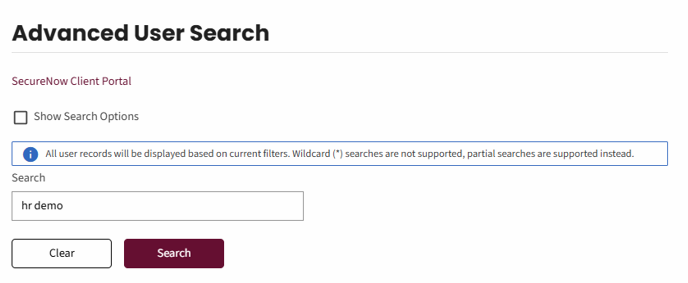
- Select the Search button

- Select edit business entitlement from the appropriate business
The entitlement view will display.
Check the box beside Wires to display the wire entitlements available for this business.

Wire Entitlements – Line-by-Line Explanation
In this section, we will explain each wire entitlement line-by-line. From the Entitlement screen, scroll down to the bottom of the screen. Select the checkbox beside Wires.
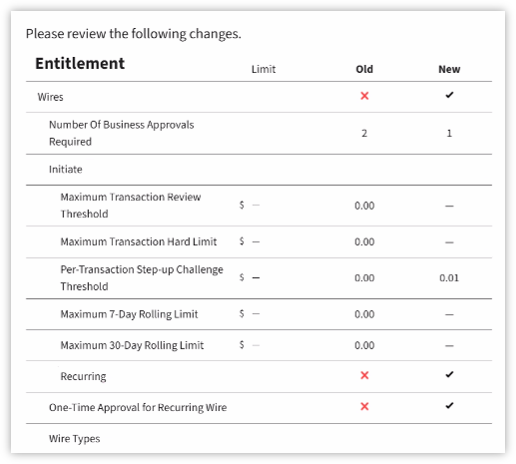
- Number of approvals required defaults to 1. All new wire customers are set up with dual control and require a minimum of one approval.
- Pre transaction set up challenge threshold defaults to 0.01 and can’t be any other amount.
- Maximum daily user review threshold, maximum daily user hard limit, maximum daily business review threshold and maximum daily business hard limit are set to the Wire limit on the BOB & TMO.
Note: if receiving a revised enrollment BOB & TMO document and the wire limit is being updated, then update these four limits.
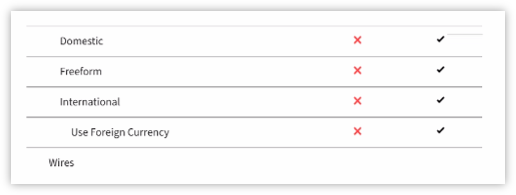
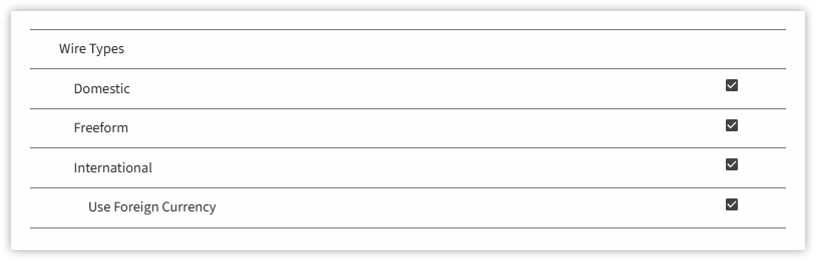
Wire Types
All wire types are defaulted check marks.
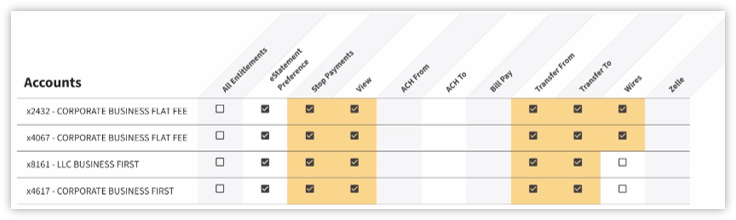
Accounts
Using the BOB TMO select the accounts that have access to wires.
Note: if receiving a revised enrollment BOB & TMO adding or removing account access for wires then check mark or un-check mark this section.
Click Save.
Review the changes and ensure they are accurate.
Click Confirm.