Business transfers will continue to support eligible internal account to account transfer functionality within digital banking.
Take a closer look at the new digital banking experience.
Key changes
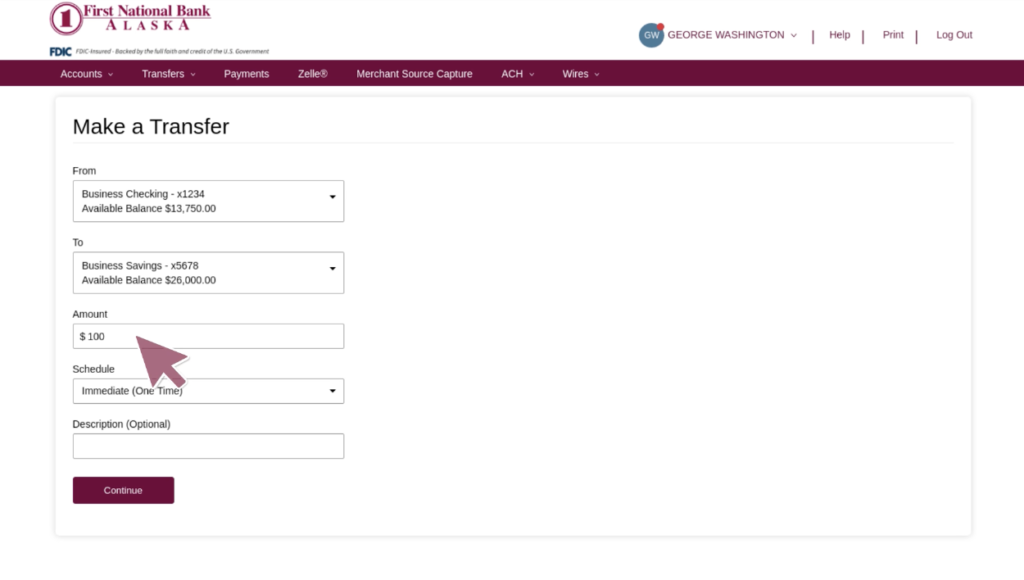
Business transfer options will be accessed through updated digital banking transfer workflows.
Internal transfer workflows will use updated navigation and screens.
Customers can now add a description to the transfers.
Transfer templates will be available through entitlements to all businesses with no backroom set up required. Permissions for other users can be more restrictive.
Transfer approvals can be set both at the user level and at the template level.
Primary benefits
- Updated transfer experience within business digital banking
- Improved navigation and usability for eligible transfer options
- More consistent experience between online and mobile banking
- Continued access to eligible business transfer capabilities
Frequently Asked Questions
-
How do I change a recurring transfer that was set up prior to the launch of new service?
Edits to transfers created prior to the launch are not permitted and will need to be deleted and recreated under the transfer history tab.
-
Will my transfer templates be available in the new platform?
Yes, transfer templates you’ve set up in Business Online Banking will transfer to the new online and mobile banking platform. After launch, check your transfer templates and user approval permissions, and contact First National if you have any concerns.