The Digital Banking Upgrade expands transfer capabilities.
Take a closer look at the new digital banking experience.
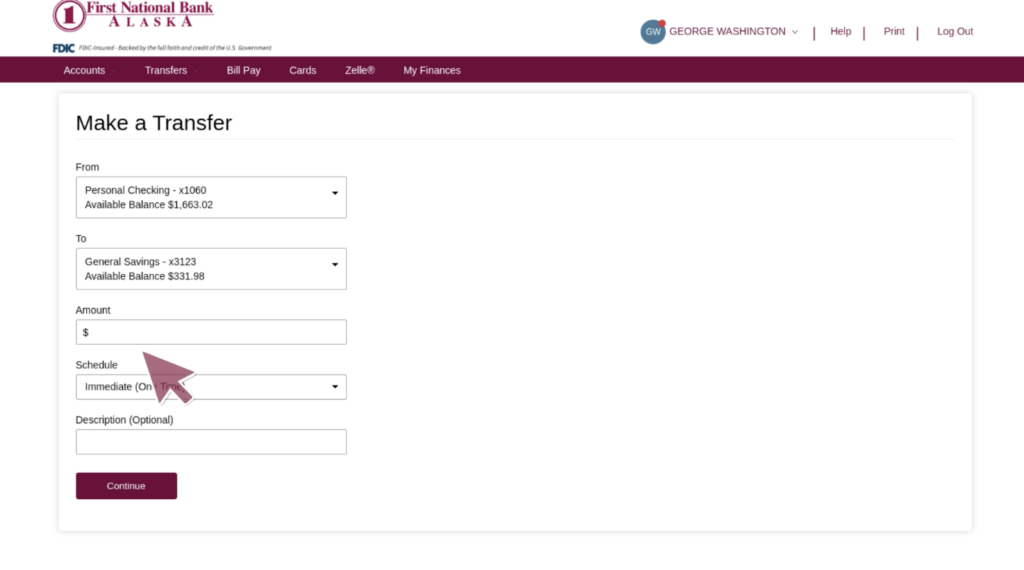
Key changes
As a First National Bank Alaska customer, you will be able to transfer funds between your own accounts and eligible accounts at external financial institutions.
You can add a description to all transfers.
Overdraft protection transfers involving repo, savings, or sweep accounts will look different in the new online and mobile banking platform and customers may need to adjust how they transfer funds from these accounts.
You can pay your First National loans from accounts at other financial institutions.
Primary benefits
- More flexibility in how you move money
- Expanded self-service transfer capabilities
-
Can I transfer money to a different financial institution through online banking?
Yes, you can use Zelle® to send money to a person at another financial institution or you can use External Tansfers to send money to yourself at another financial institution.
-
How do I change a recurring transfer that was set up prior to the launch of new service?
Edits to transfers created prior to the launch are not permitted and will need to be deleted and recreated under the transfer history tab.
-
How do I set up a recurring transfer?
Click on Transfers > First National Transfers > Make a Transfer. Under Schedule, select Recurring.
-
If I have a joint account can both owners see transfers and make changes?
No – Transfers are only visible to the user that initiated the set up.
-
Is there a cutoff time for transfers?
Transfers submitted after 9 p.m. (AKT) will be processed on the next business day.
-
Is there a set time a transfer will be in pending status before it gets processed?
Internal transfers take place immediately, if submitted prior to 9 p.m. (AKT). External transfers processing times vary based on the transfer type, destination institution, and cut-off times.
-
Will I be able to see when a transfer was originally created?
Existing recurring transfers will migrate. All transfer activity and details can be viewed under the Transfer Activity screen.