-
Will I be able to receive my one-time passcode via email or via an authenticator app in the future?
We are actively pursuing the option to receive one-time passcodes via email and hope to be able to offer this solution in 2026. We do not currently have plans to offer the ability to receive one-time passcodes via an authenticator app.
-
Who do I contact if I am locked out of online registration?
After three failed attempts to enroll in online banking your account will be locked.Contact your local branch or our Contact Center for further assistance with registration.
-
Can I request to always receive a one-time passcode to access my account?
Yes. Reach out to your local branch or the Contact Center at 907-777-4362 to enable this option on your account.
-
What if I do not receive a one-time passcode via SMS text message or automated phone call?
If you are not receiving the SMS text message, you will need to use the automated phone call option. If you do not receive the automated phone call, reach out to your local branch or the Contact Center at 907-777-4362.
You can reset your phone number(s) by following the steps below:
- Log in to Personal Online Banking.
- Click on Profile.
- Click on the Security Challenge section.
- Delete phone number and click Save.
- Re-enter the phone number and click Save.
-
What if I accidentally reply “stop” to the SMS text?
If you responded “stop” to the SMS text messages, you will need to reset your phone number by following the steps below:
- Log in to Personal Online Banking.
- Click on Profile.
- Click on the Security Challenge section.
- Delete phone number and click Save.
- Re-enter the phone number and click Save.
If you have any trouble, reach out to your local branch or our Contact Center at 907-777-4362.
-
What if I enter an incorrect one-time passcode?
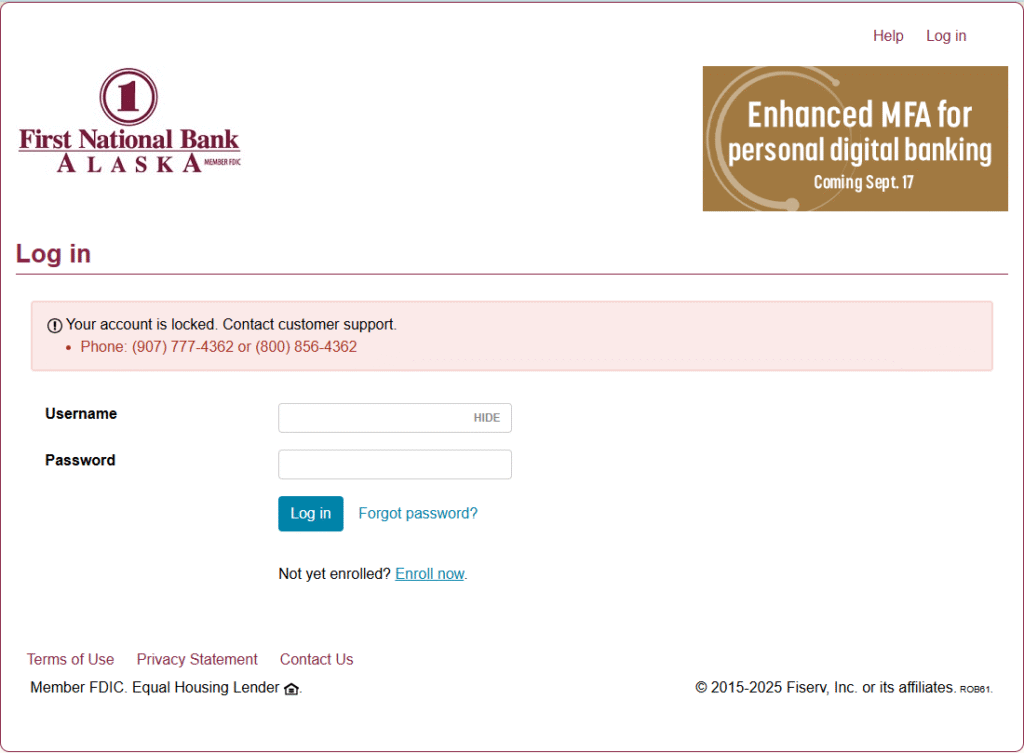
You will receive an error indicating the wrong number was entered, and you will be asked to try again. As a security measure, if the one-time passcode is entered incorrectly five times, your account will lock (see screenshot). If this happens, please call our Contact Center at 907-777-4362 or visit a branch to have your online banking access unlocked.
-
Can I set SMS text message or automated phone call as the default option to receive one-time passcodes?
No, there is no default contact method setting. When prompted, you will always need to select to receive the one-time passcode via SMS text message or an automated phone call.
-
Will Enhanced MFA work if I use a Virtual Private Network (VPN)?
Yes, as long as your VPN does not route through a blocked country. If you believe you are not able to access online or mobile banking based on your geographic location, contact your local branch or the Contact Center at 907-777-4362.
-
I only have an international phone number. Can I still access my account online?
Yes, as long as you are not trying to access your account from a blocked country. With the bank’s Enhanced Multifactor Authentication (MFA) login system automated phone calls are not compatible with international numbers. To access your account using an international number, you need to provide a mobile number to receive your one-time passcode via SMS text message.
If you believe you are not able to access online or mobile banking based on your geographic location, contact your local branch or the Contact Center at 907-777-4362.
-
When will I be asked to verify my identity with a one-time passcode after enrolling in Enhanced MFA?
You will only be prompted to enter a one-time password if you are accessing your account from a new device or our system detects suspicious behavior. The new MFA system checks
- Device type
- IP address and location
- Internet connection type and routing
- Browser version detail
-
Will Enhanced MFA affect connections to data aggregators and third-party financial applications?
Yes, when Enhanced MFA is implemented on Sept. 17, you will need to re-link your First National accounts to financial data aggregator and third-party financial applications, such as Empower Personal Dashboard, Monarch Money, YNAB, Plaid, Yodlee and Intuit (CreditKarma /TurboTax). After relinking, your accounts should stay connected without disruption.
-
How will I receive the one-time passcode?
One-time passcodes will be sent by SMS text or an automated phone call from the following numbers:
- Delivery via SMS will come from short code 36397
- Delivery via voice call to domestic numbers will come from 1-678-498-2706
Page 24 of 34