-
What will you see when you log on to Personal Online Banking or the FNBApp on or after September 17?
When logging in for the first time, you may be asked to answer one of your standard security questions. Then, the system will prompt you to enroll in Enhanced MFA by adding and verifying phone number(s) where you can receive a one-time passcode via SMS text messages or automated phone calls.
-
When will First National launch Enhanced MFA for business online banking or the FNBizApp?
Enhanced MFA for business customers will launch with our new digital experience in 2026.
-
Why is First National implementing Enhanced MFA?
You expect First National to ensure your accounts are safe. This enhancement helps us meet that expectation. Benefits of the new enhanced MFA system include:
- Increased security – A new real-time login monitoring system that includes robust device recognition and real-time threat monitoring technology.
- Best practice – We are replacing security questions with the industry-standard practice of using one-time passcodes sent via text or automated phone call.
- Improved customer experience – You will experience reduced login interruptions by only being prompted with an MFA challenge when suspicious activity is detected.
-
When is First National launching Enhanced MFA?
On Sept. 17 at 5 a.m., First National will implement Enhanced MFA for personal online and mobile banking customers. Enhanced MFA for business customers will launch with our new digital experience in 2026.
-
What is Enhanced MFA?
Enhanced MFA is a login security feature for personal online banking and the FNBApp. Enhanced MFA will confirm your credentials and the device you are using each time you log in. If the system detects a new device or suspects fraud, it will prompt you to verify your identity by entering a one-time passcode sent via SMS text message or an automated phone call.
-
How do I authorize First National to discuss my account information with someone other than me?
Download the Preferred Communication form at FNBAlaska.com/escrow. Complete, sign and return the form to any First National location or by mail to:
First National Bank Alaska
Escrow Services
PO Box 100720
Anchorage, AK 99510-0720 -
Where can I find a copy of my year-end statement?
Year-end statements are mailed to customers in January. A reproduction may be requested for a fee. If you need an additional copy, call 907-777-3430 or email escrow@fnbalaska.com. Beginning January 2026, customers will be able to review a copy of their year-end statement through the online customer portal under the Documents tab.

-
Can I update my address over the phone?
No. To update your contact information, download the Change of Address and Contact Information form at FNBAlaska.com/address. Print, complete and return the form to any First National location or by mail to:
First National Bank Alaska
Escrow Services
PO Box 100720
Anchorage, AK 99510-0720 -
Can I call Escrow Services to make a payment?
Customers can make payments via the following options:
- Any device with internet by accessing the Escrow Online Customer Portal.
- In person at any First National branch.
- Bill Pay through their financial institution.*
- Wire transfer through their financial institution (contact Escrow Services for further instructions.)*
- Or by mail to:
First National Bank Alaska
Escrow Services
PO Box 100720
Anchorage, AK 99510-0720
*For bill pay or wire transfer, please reference FNBA ABA routing number 125200060 and the escrow account number.
-
Why did I get charged a late fee?
There are several reasons why a payment may incurring a late fee. They include:
- Payment was received outside of the grace period.
- Payment was short of the full installment amount.
- Other fees may have been incurred, such as the annual fee.
For more information on why late fees were applied to your account, contact Escrow Services at 907-777-3430 or email escrow@fnbalaska.com. -
How do I know when my next payment is due?
- Log in to the Escrow Online Portal.
- Click on the account with the due date you would like to see.
- The payment due date will show at the top of the screen with an option to make a payment.
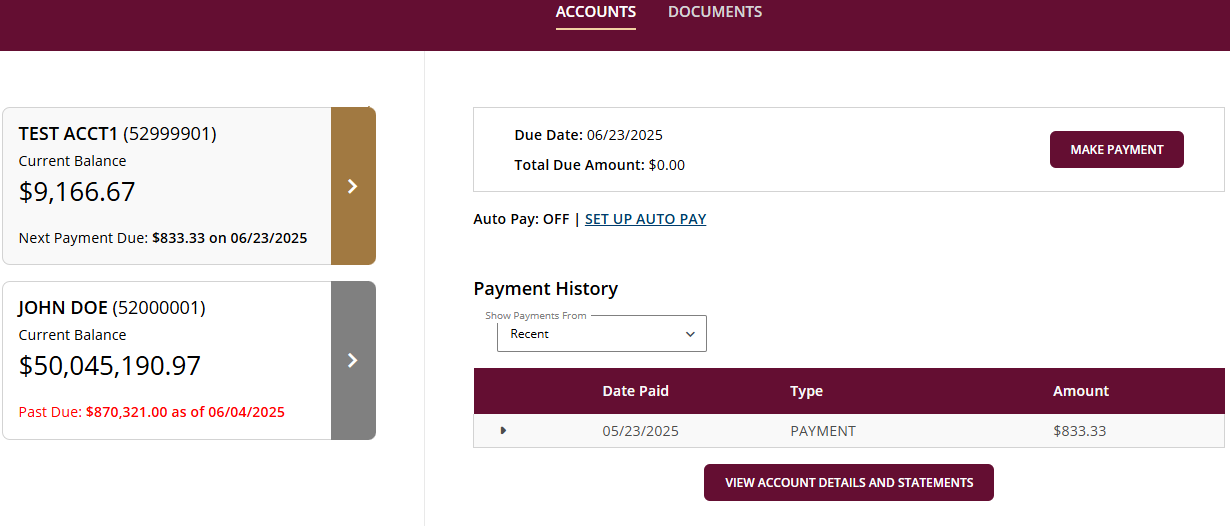
Users can also view the billing invoice by clicking on the View Account Details and Documents button.
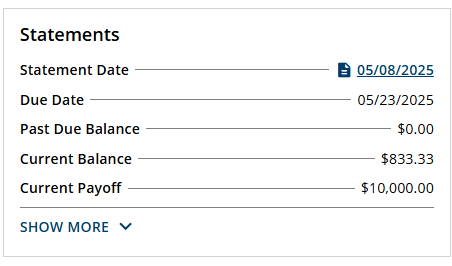
Scroll down and click on the desired statement date.- Scroll down and click on the desired statement date.
- This will bring up the billing invoice.
- The payment due date will be listed, along with any past-due balance, current balance and current payoff amount.
-
Will my direct deposits be affected?
No. Your direct deposit will not be affected.
Page 25 of 34