Initiating Deluxe Check Order
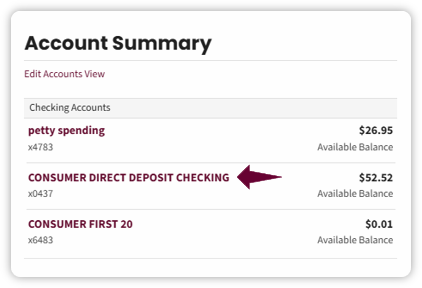
- On the Account Summary page, select the desired account to order checks.
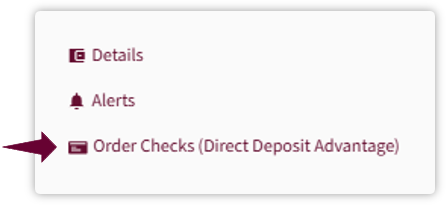
- On the Account History page, an Order Checks link will appear on eligible accounts. Click on the hyperlink.
Select Order Checks. The text shown in parentheses represents the associated checking account (for example, Direct Deposit Advantage) and indicates which account the check order will be linked too.
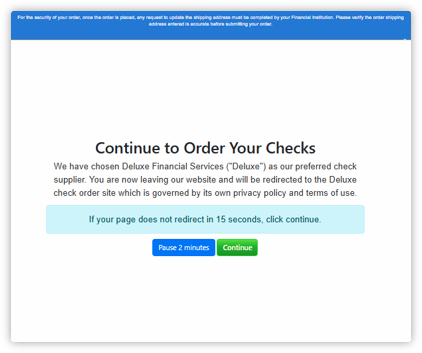
- A new window will open notifying that you will be redirected to the Deluxe Check Ordering page
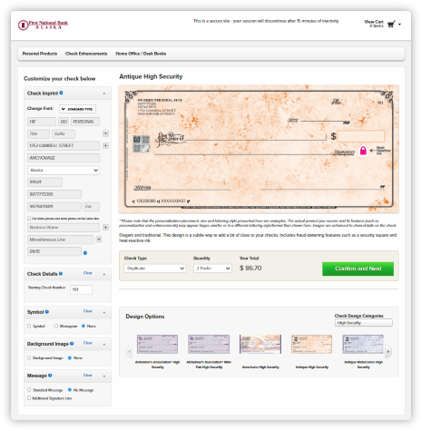
- You can now customize and order checks at your convenience. Address information cannot be changed as part of the check order. If you need to update your mailing information prior to ordering checks, you will need to contact the bank.

Deluxe Check Ordering Tip:
Always verify your mailing address before submitting the order. Incorrect address information may delay delivery or require the order to be replaced.
Deluxe Check Ordering Portal
- Review your existing check information and verify the account selected is correct.
- Confirm the shipping address and update, if necessary.
- Select the appropriate check style, quantity and any optional accessories.
- Review the order summary, including pricing and shipping method for accuracy.
- Select SUBMIT ORDER to send the order to Deluxe